A missed client call, a stalled presentation upload, or a public network that feels questionable can turn a well-planned trip into a stressful one. Knowing how to use hotel WiFi for business travel means more than entering a password at check-in. It means setting up your connection with care, protecting sensitive work, and having a simple plan when the day does not go exactly as scheduled.
For professionals visiting San José, reliable connectivity creates room to focus on the meeting, the client, or the next decision rather than the logistics around it. A few thoughtful habits can make your hotel room a productive workspace between appointments, while still leaving time to enjoy the city beyond your screen.
Start With the Right Connection
Ask about WiFi when you arrive, particularly if you have a video meeting, a large file transfer, or a virtual presentation planned. Confirm the network name directly with the front desk rather than selecting a similarly named network from the list on your device. This small step helps prevent accidentally joining an unofficial hotspot designed to imitate the hotel network.
It is also worth asking whether the property has a separate guest network, whether sign-in is required again after a period of inactivity, and where coverage is strongest. Signal strength can vary by room location, building materials, and the number of guests online at a given time. If your work depends on a stable connection, test it early, not five minutes before your call begins.
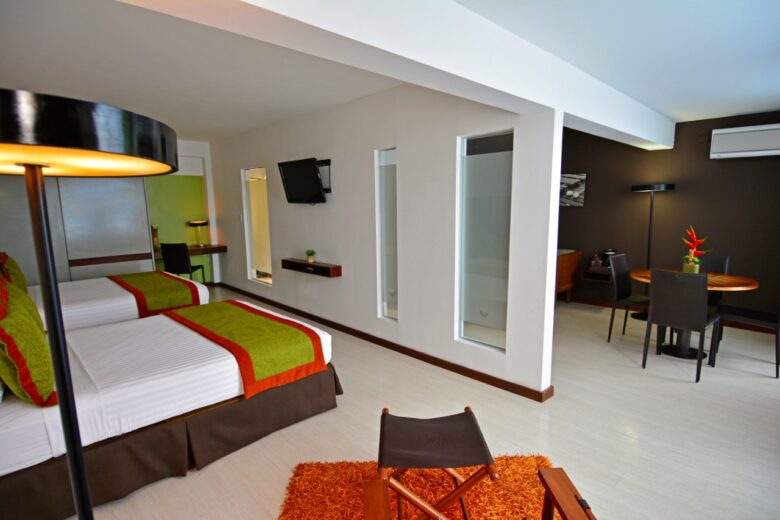
At Auténtico Hotel, guests can work with high-speed 500 Mbps WiFi, a valuable advantage for the pace of a business stay. Even with a fast connection, however, performance can depend on your own device, software updates running in the background, and the demands of your particular task.
Do a Five-Minute Test Before Your Workday
Once you are in your room, connect the devices you truly need, then open the tools you will use most: email, calendar, cloud storage, messaging platform, and video-call application. Send a brief message, open a shared file, and make a quick test call if one is available. This gives you time to resolve an access issue while the front desk can still assist you comfortably.
For an important meeting, close browser tabs and applications you are not using. Pause automatic cloud backups, photo syncing, game updates, and software downloads until after your call. These tasks can quietly consume bandwidth and make a connection appear slower than it is.
Protect Your Work on Hotel WiFi
Hotel WiFi is convenient, but it is a shared environment. Treat it as you would any public network, particularly when handling client information, financial documents, contracts, employee records, or internal company systems.
A virtual private network, or VPN, is often a sensible first layer of protection. It encrypts traffic between your device and the VPN service, which can reduce exposure on a shared network. Many organizations require a company-approved VPN for remote work, so confirm that it is installed and updated before your departure. A VPN can occasionally slow your connection, especially when connected to a server far from Costa Rica, so test it before a high-stakes meeting and choose the nearest approved server when possible.
Use websites and applications that show a secure connection, keep your operating system and browser current, and turn off file sharing, printer sharing, and device discovery while traveling. On a Windows computer, choose the public-network setting when prompted. On Apple devices, review sharing settings and disable any services you do not need during your stay.
Avoid accessing highly sensitive systems on hotel WiFi if your company policy advises against it. When in doubt, use a secure mobile hotspot for that specific task or wait until you are on an approved corporate connection. Security should be practical, not paralyzing: ordinary work can continue, but confidential work deserves an extra moment of judgment.
Make Video Calls Feel More Professional
Your connection is only one part of a good video call. The setting around you matters just as much. Choose a quiet spot in your room, position yourself facing a window or lamp rather than placing bright light behind you, and use headphones with a microphone to reduce echo and nearby noise.
Join the meeting 10 minutes early when you are presenting, interviewing, or speaking with a new client. This buffer allows you to check your camera framing, test your microphone, and reconnect if the platform needs an update. Keep your phone nearby with the meeting link ready, so you can join audio from your mobile connection if needed.
If the call is particularly important, ask the hotel team about a quieter area or available meeting space. A private room is not always the best setting for a confidential discussion if construction, corridor activity, or a busy street creates unexpected sound. Hotels with attentive staff can often help you identify a more suitable option.
Manage Bandwidth During Calls
Video calls are usually stable on a strong hotel connection, but high-definition video is not always necessary. If the connection begins to lag, turn off your camera briefly, close other devices streaming content, and ask household members or colleagues traveling with you to pause large downloads. Audio quality and a clear presentation matter more than appearing in the sharpest possible resolution.
If you are sharing slides, upload them to the meeting platform in advance or keep a PDF version ready to email. This is a useful safeguard when a live screen share becomes slow. A prepared backup feels calm and professional, even when technology is not cooperating.
Build a Backup Plan Before You Need One
Business travel rewards preparation. Before leaving home, download essential documents to your laptop and phone for offline access. Save your hotel address, meeting details, airport transfer information, and local contacts in more than one place. If a cloud service is temporarily unavailable, you should still be able to find your agenda and open the presentation.
An international data plan or eSIM can provide a practical backup connection in San José. Coverage, costs, and data allowances vary, so check with your carrier before departure. Mobile data can be especially useful for sending an urgent email, joining audio on a call, or tethering one device for a short period. It may not be the most economical choice for a day of large uploads or high-definition meetings.
Bring the right adapters and charging equipment as well. Costa Rica commonly uses 110-volt electricity and plug types A and B, similar to those used in the United States, but a compact power strip can still be helpful when your laptop, phone, and headset all need charging at once. A fully charged power bank adds another small measure of reassurance during a full day of meetings around the city.
Balance Work With the Place You Are Visiting
A hotel room can be an effective office, but business travel should not mean seeing only the inside of one. Plan focused work blocks around your meetings, then step away from the screen. A walk near La Sabana Metropolitan Park, a relaxed dinner, or a conversation with the hotel team about nearby cultural experiences can reset your attention better than another hour of inbox refreshes.
Costa Rica operates on Central Standard Time year-round and does not observe daylight saving time. For travelers coordinating with offices in the United States, that can change the time difference depending on the season. Confirm meeting times in your calendar before you travel, especially when teams are spread across several states or countries.
The best use of hotel WiFi is not constant connection. It is the confidence that your work is ready when it matters, leaving you free to arrive at each meeting present, prepared, and able to enjoy a little of San José in between.